
Home
A Color Guide to iPhone 14 and iPhone 14 Pro for Seniors: A Guide to the 2022 iPhone (with iOS 16) with Full Color Graphics and Illustrations
Barnes and Noble
Loading Inventory...
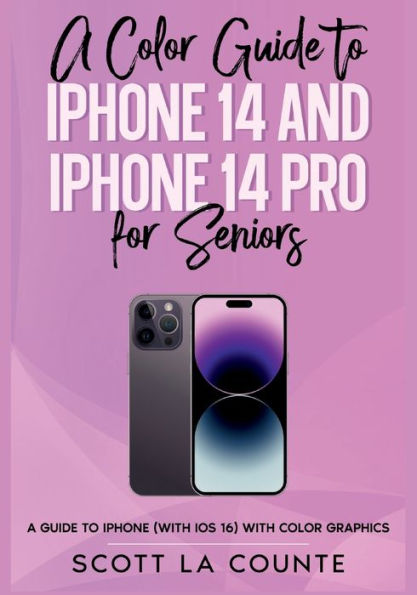
A Color Guide to iPhone 14 and iPhone 14 Pro for Seniors: A Guide to the 2022 iPhone (with iOS 16) with Full Color Graphics and Illustrations in Franklin, TN
Current price: $24.99
Barnes and Noble
A Color Guide to iPhone 14 and iPhone 14 Pro for Seniors: A Guide to the 2022 iPhone (with iOS 16) with Full Color Graphics and Illustrations in Franklin, TN
Current price: $24.99
Loading Inventory...
Size: OS
Inside, you are going to learn about:
● What's new to iOS 16
● The differences between the iPhone 14 and iPhone 14 Pro
● Using an iPhone that doesn't have a Home button
● Using Face ID
● Cinematic Mode
● Using Dynamic Island (iPhone 14 Pro Only)
● Using a Focus
● How to use Picture-in-Picture for movies and TV shows
● How to add widgets to your Home screen
● Organizing apps with the App Library
● Buying, removing, rearranging, updating apps
● MagSafe
● Unsending and editing text messages
● Using Crash Detection
● Taking, editing, organizing, and sharing photos
● Apple Services (Apple Music, Apple TV+, Apple Card, iCloud, and Fitness+)
● Using Siri
● Using pre-installed apps like Calendar, Reminders, and more
● Making phone calls and sending messages
● And much, much more!
● What's new to iOS 16
● The differences between the iPhone 14 and iPhone 14 Pro
● Using an iPhone that doesn't have a Home button
● Using Face ID
● Cinematic Mode
● Using Dynamic Island (iPhone 14 Pro Only)
● Using a Focus
● How to use Picture-in-Picture for movies and TV shows
● How to add widgets to your Home screen
● Organizing apps with the App Library
● Buying, removing, rearranging, updating apps
● MagSafe
● Unsending and editing text messages
● Using Crash Detection
● Taking, editing, organizing, and sharing photos
● Apple Services (Apple Music, Apple TV+, Apple Card, iCloud, and Fitness+)
● Using Siri
● Using pre-installed apps like Calendar, Reminders, and more
● Making phone calls and sending messages
● And much, much more!
Inside, you are going to learn about:
● What's new to iOS 16
● The differences between the iPhone 14 and iPhone 14 Pro
● Using an iPhone that doesn't have a Home button
● Using Face ID
● Cinematic Mode
● Using Dynamic Island (iPhone 14 Pro Only)
● Using a Focus
● How to use Picture-in-Picture for movies and TV shows
● How to add widgets to your Home screen
● Organizing apps with the App Library
● Buying, removing, rearranging, updating apps
● MagSafe
● Unsending and editing text messages
● Using Crash Detection
● Taking, editing, organizing, and sharing photos
● Apple Services (Apple Music, Apple TV+, Apple Card, iCloud, and Fitness+)
● Using Siri
● Using pre-installed apps like Calendar, Reminders, and more
● Making phone calls and sending messages
● And much, much more!
● What's new to iOS 16
● The differences between the iPhone 14 and iPhone 14 Pro
● Using an iPhone that doesn't have a Home button
● Using Face ID
● Cinematic Mode
● Using Dynamic Island (iPhone 14 Pro Only)
● Using a Focus
● How to use Picture-in-Picture for movies and TV shows
● How to add widgets to your Home screen
● Organizing apps with the App Library
● Buying, removing, rearranging, updating apps
● MagSafe
● Unsending and editing text messages
● Using Crash Detection
● Taking, editing, organizing, and sharing photos
● Apple Services (Apple Music, Apple TV+, Apple Card, iCloud, and Fitness+)
● Using Siri
● Using pre-installed apps like Calendar, Reminders, and more
● Making phone calls and sending messages
● And much, much more!
You May Also Like







More About Barnes and Noble at CoolSprings Galleria
Barnes & Noble is the world’s largest retail bookseller and a leading retailer of content, digital media and educational products. Our Nook Digital business offers a lineup of NOOK® tablets and e-Readers and an expansive collection of digital reading content through the NOOK Store®. Barnes & Noble’s mission is to operate the best omni-channel specialty retail business in America, helping both our customers and booksellers reach their aspirations, while being a credit to the communities we serve.
1800 Galleria Blvd #1310, Franklin, TN 37067, United States
Find Barnes and Noble at CoolSprings Galleria in Franklin, TN
Visit Barnes and Noble at CoolSprings Galleria in Franklin, TN