
Home
Android Developer Tools Essentials: Studio to Zipalign
Barnes and Noble
Loading Inventory...
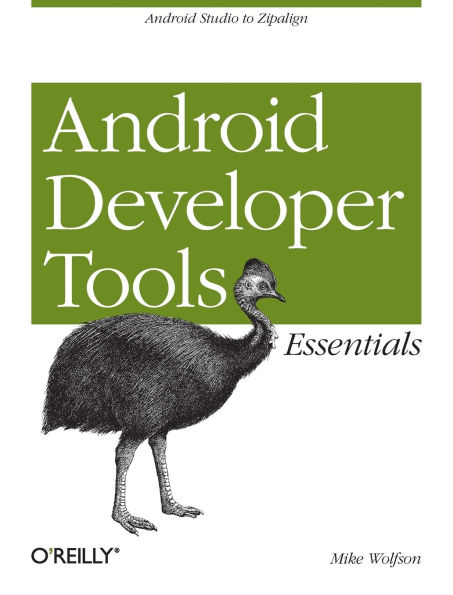
Android Developer Tools Essentials: Studio to Zipalign in Franklin, TN
Current price: $24.99
Barnes and Noble
Android Developer Tools Essentials: Studio to Zipalign in Franklin, TN
Current price: $24.99
Loading Inventory...
Size: Paperback
Android development can be challenging, but through the effective use of Android Developer Tools (ADT), you can make the process easier and improve the quality of your code. This concise guide demonstrates how to build apps with ADT for a device family that features several screen sizes, different hardware capabilities, and a varying number of resources.
With examples in Windows, Linux, and Mac OS X, you’ll learn how to set up an Android development environment and use ADT with the Eclipse IDE. Also, contributor Donn Felker introduces Android Studio, a Google IDE that will eventually replace Eclipse.
Learn how to use Eclipse and ADT together to develop Android code
Create emulators of various sizes and configurations to test your code
Master Eclipse tools, or explore the new Android Studio
Use Logcat, Lint, and other ADT tools to test and debug your code
Simulate real-world events, including location, sensors, and telephony
Create dynamic and efficient UIs, using Graphical Layout tools
Monitor and optimize you application performance using DDMS, HierarchyViewer, and the Android Monitor tool
Use Wizards and shortcuts to generate code and image assets
Compile and package Android code with Ant and Gradle
With examples in Windows, Linux, and Mac OS X, you’ll learn how to set up an Android development environment and use ADT with the Eclipse IDE. Also, contributor Donn Felker introduces Android Studio, a Google IDE that will eventually replace Eclipse.
Learn how to use Eclipse and ADT together to develop Android code
Create emulators of various sizes and configurations to test your code
Master Eclipse tools, or explore the new Android Studio
Use Logcat, Lint, and other ADT tools to test and debug your code
Simulate real-world events, including location, sensors, and telephony
Create dynamic and efficient UIs, using Graphical Layout tools
Monitor and optimize you application performance using DDMS, HierarchyViewer, and the Android Monitor tool
Use Wizards and shortcuts to generate code and image assets
Compile and package Android code with Ant and Gradle
Android development can be challenging, but through the effective use of Android Developer Tools (ADT), you can make the process easier and improve the quality of your code. This concise guide demonstrates how to build apps with ADT for a device family that features several screen sizes, different hardware capabilities, and a varying number of resources.
With examples in Windows, Linux, and Mac OS X, you’ll learn how to set up an Android development environment and use ADT with the Eclipse IDE. Also, contributor Donn Felker introduces Android Studio, a Google IDE that will eventually replace Eclipse.
Learn how to use Eclipse and ADT together to develop Android code
Create emulators of various sizes and configurations to test your code
Master Eclipse tools, or explore the new Android Studio
Use Logcat, Lint, and other ADT tools to test and debug your code
Simulate real-world events, including location, sensors, and telephony
Create dynamic and efficient UIs, using Graphical Layout tools
Monitor and optimize you application performance using DDMS, HierarchyViewer, and the Android Monitor tool
Use Wizards and shortcuts to generate code and image assets
Compile and package Android code with Ant and Gradle
With examples in Windows, Linux, and Mac OS X, you’ll learn how to set up an Android development environment and use ADT with the Eclipse IDE. Also, contributor Donn Felker introduces Android Studio, a Google IDE that will eventually replace Eclipse.
Learn how to use Eclipse and ADT together to develop Android code
Create emulators of various sizes and configurations to test your code
Master Eclipse tools, or explore the new Android Studio
Use Logcat, Lint, and other ADT tools to test and debug your code
Simulate real-world events, including location, sensors, and telephony
Create dynamic and efficient UIs, using Graphical Layout tools
Monitor and optimize you application performance using DDMS, HierarchyViewer, and the Android Monitor tool
Use Wizards and shortcuts to generate code and image assets
Compile and package Android code with Ant and Gradle
You May Also Like
![The Essential Stephen Sondheim [Barnes & Noble Exclusive]](https://prodimage.images-bn.com/pimages/0196587221911_p0_v4_s600x595.jpg)









More About Barnes and Noble at CoolSprings Galleria
Barnes & Noble is the world’s largest retail bookseller and a leading retailer of content, digital media and educational products. Our Nook Digital business offers a lineup of NOOK® tablets and e-Readers and an expansive collection of digital reading content through the NOOK Store®. Barnes & Noble’s mission is to operate the best omni-channel specialty retail business in America, helping both our customers and booksellers reach their aspirations, while being a credit to the communities we serve.
1800 Galleria Blvd #1310, Franklin, TN 37067, United States
Find Barnes and Noble at CoolSprings Galleria in Franklin, TN
Visit Barnes and Noble at CoolSprings Galleria in Franklin, TN